How to Split a Song into Stems: Clean Vocals, Drums and Bass From Any Track
What stem splitting is, how it works, which split to choose, and how to get clean vocals, drums and bass from any song, with simple fixes for bleed and watery artifacts.
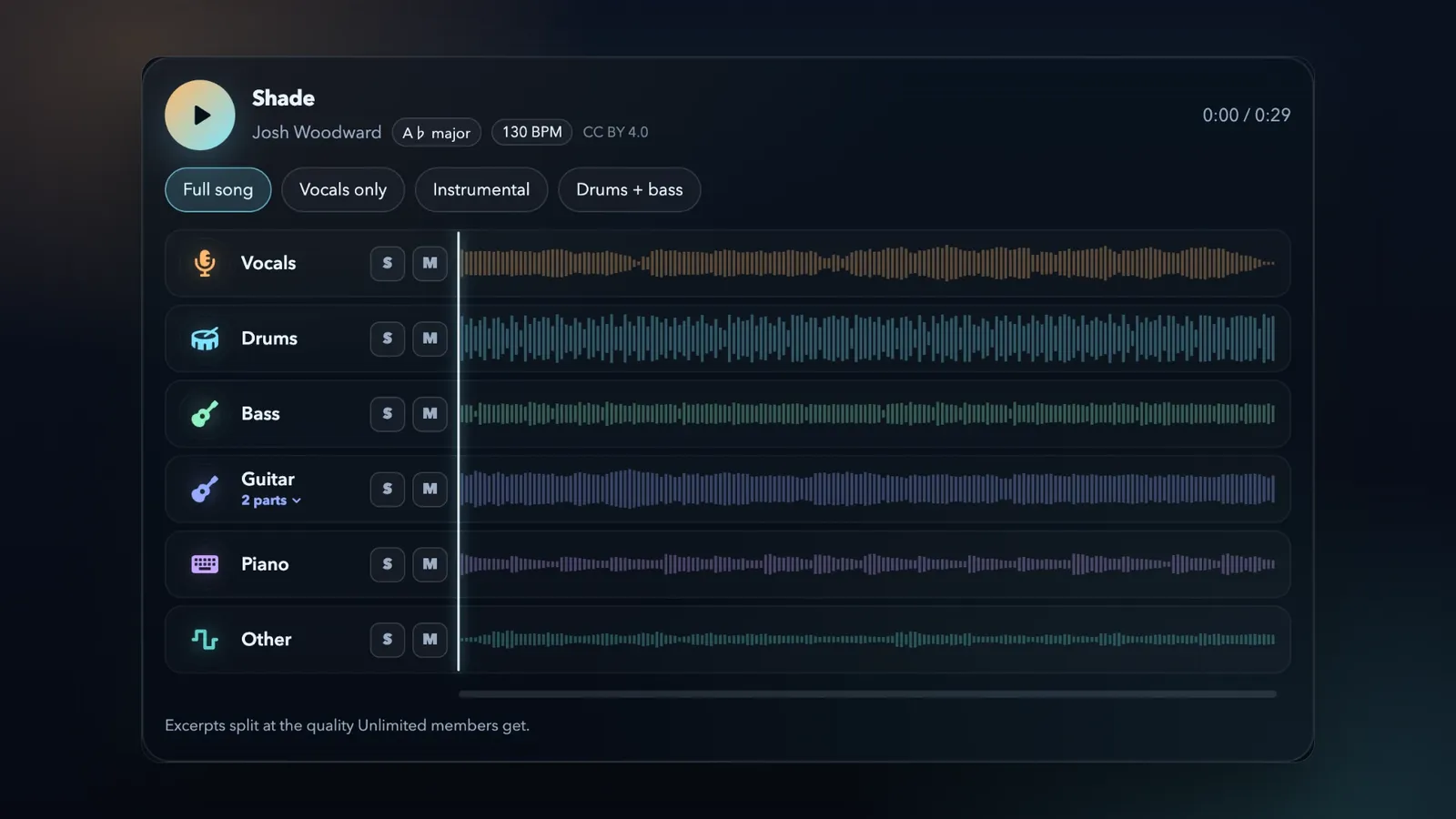
Every finished song is a sealed box. The vocal, the drums, the bass and the keys started on separate tracks. Then someone mixed them into one stereo file, and the separate parts were gone.
Stem splitting opens the box again. You upload one song to a stem splitter, and you get its parts back as separate audio files: the vocal on one track, the drums on another, the bass on a third.
The technology is now good enough for the biggest records. To finish "Now and Then" in 2023, the team behind The Beatles used audio separation to lift John Lennon's voice off his old home demo, away from his piano. Earlier attempts had failed because nobody could pull the two apart.
It is not magic, and it is not perfect. But today it is good enough to make a karaoke track in a minute, pull a clean acapella for a remix, learn a bass line note by note, or give an old song a new mix. The result depends on three things that you control: the file you upload, the split you choose, and what you do with the stems after. This guide covers all three.
The short version: upload the best copy of the song that you have. WAV, FLAC or AIFF is better than MP3. Choose 2 stems for vocals and instrumental, or 6 stems for every main part. Wait about a minute. Then solo each stem in the busiest part of the song before you download. Every stem runs the full length of the song, so all of them line up at 0:00 in your DAW.
What is a stem?
A stem is one part of a song, saved as its own audio file. Vocals, drums and bass are the classic stems. A stem can hold one instrument or a group of related parts: the drums stem holds the kick, the snare, the hi-hats and the cymbals together.
Stems are not the same as multitracks. Multitracks are the original recording tracks, often one for each microphone or synth. A modern pop song can have 60 or more of them. Stems are the few groups that a session is bounced into, usually four to eight.
You will see a few more words:
- Acapella: the vocals alone.
- Instrumental: everything except the vocals.
- Karaoke track: the instrumental, sometimes with the backing vocals kept in.
- Stem splitting: getting stems back from a finished stereo song. People also call it stem separation, source separation or demixing.
If you have the original session, you do not need a stem splitter. Export real stems from your DAW: they are always cleaner than any separation. Stem splitting is for the moment when the session is gone, or when it was never yours.
How stem splitting works (without the math)
A finished song is one waveform, with every instrument added into it. You cannot pull the parts apart again with EQ, because instruments share frequencies. A kick drum and a bass both live in the low end. A voice and a guitar share the mids.
The old trick was phase cancellation: remove everything that sits in the center of the stereo image. That removes the lead vocal, but it also removes the kick, the snare and the bass, because they usually sit in the center too. This is why old karaoke tracks sounded so thin.
Modern stem splitters use AI models. A model learns from thousands of songs where the separate parts are known. Then it listens to a new song and estimates what each part sounds like on its own.
Many models look at a spectrogram: a picture of the sound, with time from left to right, pitch from bottom to top, and brightness for loudness. For each small point of that picture, the model decides how much belongs to the voice, how much to the drums, and so on. Other models work on the waveform itself, and the strongest systems use both views.
Researchers score the result with SDR (signal-to-distortion ratio), in decibels. SDR compares the part that you want with everything that is wrong in the stem: bleed, artifacts and missing sound. Higher is better, and every 3 dB roughly halves the error. In the Music Demixing Challenge 2021, the best system scored 8.3 dB on average. Two years later, the winner of the Sound Demixing Challenge 2023 scored almost 10 dB, and more than 11 dB on vocals.
The score is not the whole story. In the 2023 challenge, professional engineers also compared the systems by ear, and their favorite was only third by score. Your ears are the final test, and this guide shows you how to use them.
When a model is not sure, you hear it. There are two common mistakes:
- Bleed: a little of another part leaks into a stem. You hear a ghost of the hi-hat in the vocal, or a trace of the vocal in the guitar.
- Artifacts: the sound turns watery, metallic or "underwater", mostly in the gaps between notes. This happens where the model removed too much, or could not decide which part owns a sound.
Both get worse where parts overlap most: two instruments in the same range, playing at the same time. In those spots, the model can only share the sound out between the stems. Many models also reuse the timing detail of the full mix (its phase) for every stem, and where two sounds overlap, that borrowed phase is what gives a stem its watery, phasey sound.
Reverb is the hardest case. A reverb tail belongs to the voice, but it washes over everything else, so the model must decide where it goes.
2 stems, 6 stems or more: which split do you need?
More stems are not always better. Choose the split that fits what you want to make:
- Karaoke or an instrumental: 2 stems. You get the vocals and the instrumental.
- An acapella for a remix: 2 stems for the full vocal. For a cleaner lead, use 6 stems and the lead and backing vocal split.
- Learning a part or playing along: 6 stems. Mute your instrument and play its part yourself.
- Drum loops and beat flips: 6 stems with the drum kit split.
- MIDI and transcription: 6 stems. One instrument turns into MIDI much better than a full mix.
- A new mix of the whole song: 6 stems with every extra split, so each part gets its own fader.
In the LoopMastering Stem Splitter, 6-Stems gives you vocals, drums, bass, guitar, piano and other. Other holds everything that is not in the first five, such as synths, strings, pads and organ. 2-Stems gives you the vocals and the instrumental. The instrumental is everything that is not the vocal, so no guitar or synth gets lost between the two files.
Then the Stem Splitter listens a second time, and it splits the parts that the song actually has:
- Vocals into the lead and the backing vocals.
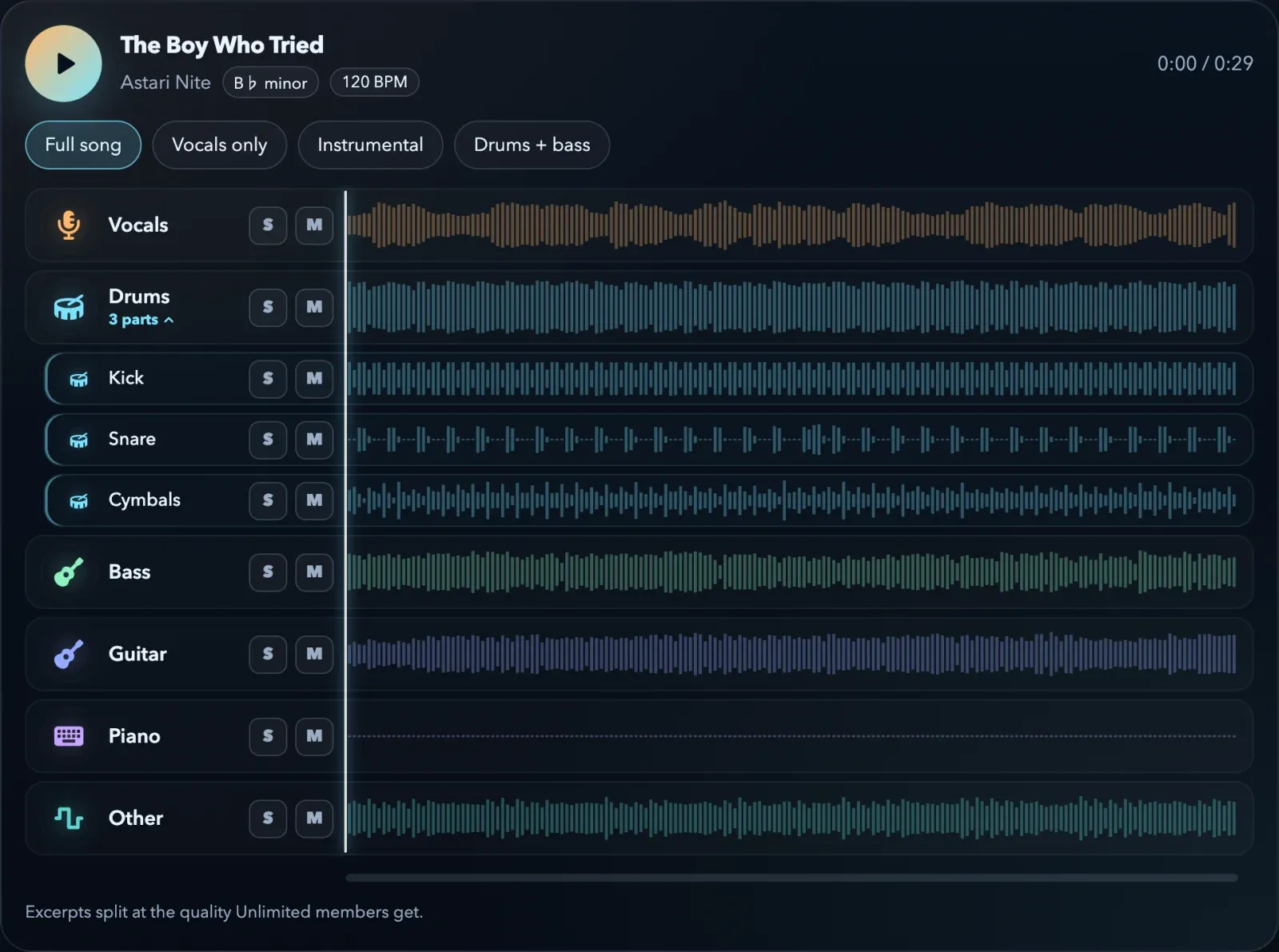
- Drums into kick, snare, toms, and hats and cymbals.
- Guitar into acoustic and electric, when the song has both.
- Other into brass and the rest, when the song has a horn section.
A song with no horns does not get an empty brass track. And nothing gets lost between the parts: the extra splits add back up to their parent stem. Put the drum parts back together, and you have the full drums stem again. Adding up is not the same as perfect, so still check each part by ear. But no sound disappears when you split further.
Here is a real split from the demo on our Stem Splitter page: "The Boy Who Tried" by Astari Nite. The song has no toms, so the drums come apart into kick, snare and cymbals only.
Get the cleanest stems: start with the best file
The model can only separate what is in the file. The upload changes the result more than anything else, and it is the easiest part to get right.
Use a lossless file when you can
WAV, FLAC and AIFF keep all of the audio. MP3, AAC and most streamed audio throw away detail that the encoder thinks you will not miss. But that quiet detail is exactly what helps a model tell two parts apart. Lossy encoding also smears the sound a little in time, and the model then spreads that smear across the stems.
If MP3 is all you have, use the highest bit rate, such as 320 kbps. Do not convert the MP3 to WAV first. The WAV is bigger, but the lost detail does not come back.
Use the original version of the song
Split the album or single version. Avoid slowed + reverb edits, sped-up versions, "8D audio", bass-boosted uploads and phone recordings of a speaker. Each of these adds reverb, distortion or noise that glues the parts together.
Do not process the file first
Upload the song as it is. Do not EQ it, compress it, "enhance" it or make it louder. Extra processing changes every part at once, and it often adds distortion that belongs to no instrument.
Split the less crushed version
Dense, very loud masters split worse than open, dynamic ones. Heavy limiting fills every gap, and hard clipping turns peaks into distortion that the model cannot give back to one part. If a song exists in more than one version, split the one that is less loud. If it is your own song, split the premaster without the limiter, not the loud master.
Old mono recordings and live recordings split too, but expect more bleed: the model has fewer clues to tell the parts apart.
The Stem Splitter takes MP3, WAV, FLAC, AIFF, M4A and AAC files, and videos such as MP4 or MOV.
What splits well, and what is still hard
Set your expectations by the part:
- Usually very clean: lead vocals and drums. They have strong, clear shapes, and models learn them from the most examples.
- Solid, but sometimes dull: bass. The low notes come out well. But the bright edge and the pluck of a bass share space with the guitars and the kick, so a separated bass can sound duller than the original.
- Usually good: piano and guitar, when they play different roles in the song.
- Harder: two instruments in the same range that play the same line, such as a guitar doubled by a synth, or a kick and an 808 on the same low notes. Harmonies that sit very close to the lead. Distorted guitars over dense cymbals. Big reverbs, choirs and gospel stacks. Heavy vocal effects, such as vocoders and distortion.
- Other: every sound without its own stem goes here, such as synth pads, strings, organ and sound effects.
This list does not mean "do not try". It means that when a stem sounds rough, the song is probably in the harder group, and the fixes below help.
How to check your stems in two minutes
Do not judge a split by its first ten seconds, because most intros are easy. Check it like this:
- Solo each stem in the loudest chorus. The parts overlap most there, so problems show there first.
- Then listen to the quiet parts: the intro, a breakdown and the fade-out. Artifacts are easiest to hear in the gaps.
- Listen for bleed (a ghost of another part) and for artifacts (a watery or metallic sound).
- Mute the vocal and listen to the rest. A ghost of the vocal in the instrumental is the most common problem in a karaoke track.
- Put the stem back in context. Stems almost always sound better in a mix than in solo, and a little bleed often disappears when the other parts play.
Match the check to the job. Karaoke and practice forgive a little bleed. A remix that you release, or a sample in your beat, needs cleaner stems.
Use headphones for the solo check and speakers for the context check. In the Stem Splitter, you can solo and mute any stem while the song plays.
How to fix bleed and artifacts in your DAW
Small problems need small fixes. If a stem needs a chain of ten plug-ins, try a better source file or a different split instead.
- Low rumble in an acapella: a high-pass filter at about 80 to 100 Hz removes most of the kick and bass under the voice.
- Noise between phrases: a gentle gate or expander closes the gaps. Use a slow release, so the ends of the words stay.
- Small watery artifacts: a little reverb or delay on the acapella hides them in a remix.
- Hi-hat in the bass: a low-pass filter on the bass stem removes it.
- A dull bass: add a little upper-mid EQ or gentle saturation, so the bass reads on small speakers. Or turn the bass into MIDI and play the line again with your own sound.
- Watery cymbals: do not boost the highs. A boost makes the artifacts louder. Keep the cymbals a little lower in the mix instead.
- A weak or messy kick and snare: use the kick and snare parts to trigger drum samples, or turn the drums into MIDI and play your own kit.
- A vocal ghost in the instrumental: in that section, dip the upper mids a little, or let your new vocal cover it.
What you can make with stems
Karaoke and backing tracks
Choose 2-Stems and download the instrumental. Or choose 6-Stems, mute the lead vocal, and keep the backing vocals, so you sing over the real harmonies. In the Stem Splitter, "Download this mix" saves what you hear as one file, without the stems that you muted.
If the song sits too high or too low for your voice, move it to your key while you practice, or slow it down. Your downloads keep the original key and tempo, or you can download them in the new key and tempo.
For a quick acapella and instrumental, you can also use the free vocal remover.
Acapellas, remixes and mashups
You need the key and the tempo. The Stem Splitter shows both: the key with its Camelot code for harmonic mixing, and the BPM. Set your project to the song's tempo, drop the acapella at bar 1, and it lines up. A song played by a live band drifts in tempo, so use your DAW's warp or tempo map for those songs.
For a remix vocal, the lead vocal part alone often sounds cleaner than the full vocal stem. Add the backing vocals back only where you want them.
DJ edits
Most DJ software can now split stems live, and that is great for improvising. But live stems are made on your laptop while you play, and Digital DJ Tips found that they never sound as good as stems prepared in advance. For the moments that matter, such as an acapella intro or a drums-only outro, split the song at home, check the stems, and bring the files to the gig.
Practice and learning
Mute your instrument and play the part with the band. Solo it to learn every note. Slow the song down without a change in pitch, or move it to your key.
The Stem Splitter's metronome follows the beat of the song, with a count-in of one or two bars. When a live drummer pushes and pulls the tempo, the click follows the drummer. You can also export the click track as a WAV.
MIDI and transcription
One instrument is much easier to transcribe than a full mix. Solo the bass, and the bass line is right there. The Stem Splitter turns bass, piano, guitar, vocal and drum stems into MIDI notes that you can drag into your DAW. Check MIDI by ear: it gives you a fast start, not a finished score. To turn a whole song into MIDI, try Audio to MIDI.
Sampling
Stems let you take one drum break or one chord stab without the rest of the song on top. A sample from someone else's record needs clearance before you release it. There is more about this below.
A new mix of your own old song
Did you lose the session of an old song? Split the stereo bounce, make a new mix of the stems with online mixing, and then send that mix to mastering. You get a new version of a song that you thought was finished forever.
How to use stems in your DAW
- Line them up: every stem has the same length as the song and starts at the same point. Drop all of them at 0:00, and they play in sync.
- Match the sample rate: WAV stems come at 44.1 kHz. Use a 44.1 kHz project, or let your DAW convert the files when it imports them.
- Use WAV for work: 24-bit WAV for editing and mixing. MP3 or M4A is fine for practice and quick sharing.
- Set the tempo: enter the BPM, then check the grid against the drums. Warp the stems if the tempo drifts.
- Name and color the tracks: a project with twelve stems gets confusing fast.
Is it legal to split a song into stems?
Splitting a song does not change who owns it. Every song has two sets of rights: the recording, usually owned by the label, and the composition, usually owned by the songwriters and their publisher. The law is different from country to country, and this is not legal advice. But the general rules are clear:
- Usually fine: your own songs, music that you have a licence for, and stems for private practice or study.
- Needs permission from both owners: releasing a remix, a cover that uses the original instrumental, or a sample of someone else's recording. The same goes for streaming services and monetized videos.
- No sample is "short enough": there is no number of seconds that makes a sample safe to release.
- Free is still sharing: posting a remix online for free is still distribution.
Official stem packs and remix contests are the easy way in, because the permission comes with the files. Only split music that you have the rights to use, or use the stems for private practice. On LoopMastering, your uploads stay private.
Quick stem splitting checklist
Best source: the original version of the song, in WAV, FLAC or AIFF if you have it.
Right split: 2 stems for vocals and instrumental, 6 stems for every main part, and the extra splits for the drum kit and the vocal stack.
Checked by ear: you soloed every stem in the chorus and in the quiet parts.
Light clean-up: a filter, a gate or a small EQ cut, not a repair chain.
Lined up: every stem starts at 0:00, in a project at the song's tempo.
Rights: it is your song, you have permission, or the stems are for private practice.
Stem splitting FAQ
Is stem splitting free on LoopMastering?
Yes. You can split songs and preview every stem in your browser for free, without an account. To download the stems, get Unlimited or buy that one song.
How long does a split take?
Most songs are ready in about a minute, and nine in ten in under two minutes. You can leave the page, and we can email you when the stems are ready.
How many stems can I get from one song?
Six main stems. With the extra splits, one song can give you up to 16 tracks: the six main stems, plus lead and backing vocals, kick, snare, toms, hats and cymbals, acoustic and electric guitar, and brass with "Other (no brass)". An extra split only appears when the song has that part.
Do the stems add back up to the original song?
With 2 stems, yes. The instrumental is the song minus the vocal, so the two files together give you the song back. The extra splits work the same way: the drum parts add back up to the drums stem, and the vocal parts to the vocals stem. The six main stems are six separate estimates, so together they come very close to the song, but not always exactly. And a sum that adds up does not prove that each stem is clean, so still check each one by ear.
Why does my vocal stem sound watery?
The model was not sure which part owned some sounds. The usual causes are reverb, a lossy source file, or another part in the same range as the voice. Try a lossless file, try the lead vocal part, and add a little reverb in your mix to hide small artifacts.
Why does my bass stem sound dull?
The low notes of a bass separate well. But its bright edge, such as the pluck of the strings or the buzz of a synth bass, shares space with the guitars, the keys and the kick, and some of that edge goes to the other stems. Add a little upper-mid EQ or gentle saturation to bring the edge back. Or turn the bass into MIDI and play the line again with your own sound.
Can I get a perfect acapella?
Close, but not always identical to the studio vocal. A clean pop or hip-hop vocal can come out very close. A song with big reverb and dense harmonies gives more bleed.
Should I upload WAV or MP3?
WAV, FLAC or AIFF when you have them. MP3 works, but the stems are only as good as the file.
Can I split the audio from a video?
Yes. Upload an MP4 or MOV file, and the Stem Splitter takes the audio from it.
Can I mix or master the stems after?
Yes. Upload your stems to Mixing to get a finished mix, then send the mix to mastering. Both are part of LoopMastering. Our guide on how to mix a song from stems shows every step.
Try it on a song you know well
The best way to learn what stem splitting can do is to hear it on a song that you know by heart. Upload it to the Stem Splitter, open the parts, and solo the vocal in the chorus.
The short version: start with the best file you have, choose the split that fits your goal, check every stem where the song is busiest, fix small problems with small tools, and line everything up at 0:00. That is how you get clean stems from a finished song.